🎉 Up to 70% Off Selected ItemsShop Sale

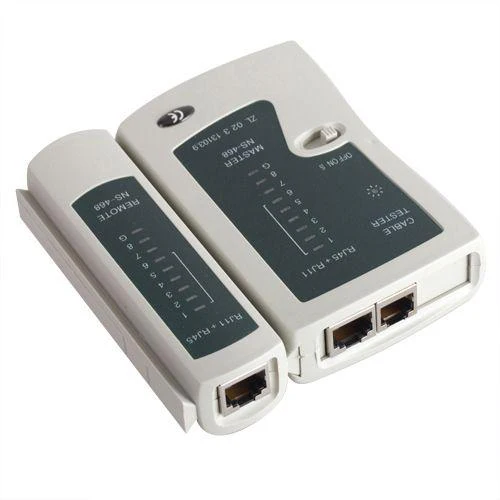
RJ45, RJ11 Network Cable Tester
- RJ45 Network Cable Tester
- Contents Include
- Cable Tester Master Unit
- Remote Unit
- Colour: Grey
- Inputs / Outputs: RJ11 & RJ45
- Takes a 9 Volt Battery (Not Included)
- Does Not Come With Carry Bag (Video May Show This)
- Option to Purchase F-Type Satellite & BNC Adapters
- These Adapters Allow You Test RG6 Satellite Cable & CCTV BNC Cables
- If Purchased, Uses Pin 1 & 2 on Tester For Testing BNC / Satellite Cables
- CC 8203200000 0.210kg Y
Uses of RJ45 Network Cable Tester
- This unit is used to test 2 types of cable:
- Telephone phone cable terminated with RJ11's (4 pins)
- CAT5 or CAT6 cable terminated with RJ45's (8 pins)
- It is normally used to check a cable that has been manually terminated
- Also it can be used to check a cable in a wall
- Will work with straight through or crossover cables
How to Use RJ45 Network Cable Tester
- Detach the master and remote unit from each other
- Plug the jack e.g. RJ45 into the master unit
- Plug the other end of the cable into the remote unit
- Turn on the master unit by sliding over the switch to either
- ON = Normal test mode
- S = Slow automatic mode
- The tester now checks each of the 8 wires one after the other
- If wired correctly the sequence on both the master and remote unit will be
- 1-2-3-4-5-6-7-8
- If the cable is wired incorrectly then the sequence on the remote unit will be out of sync
- 1-2-4-3-5-6-7-8
- If there is a short, then no light will come on in the remote unit
- RJ45 Network Cable Tester
- Contents Include
- Cable Tester Master Unit
- Remote Unit
- Colour: Grey
- Inputs / Outputs: RJ11 & RJ45
- Takes a 9 Volt Battery (Not Included)
- Does Not Come With Carry Bag (Video May Show This)
- Option to Purchase F-Type Satellite & BNC Adapters
- These Adapters Allow You Test RG6 Satellite Cable & CCTV BNC Cables
- If Purchased, Uses Pin 1 & 2 on Tester For Testing BNC / Satellite Cables
- CC 8203200000 0.210kg Y
Uses of RJ45 Network Cable Tester
- This unit is used to test 2 types of cable:
- Telephone phone cable terminated with RJ11's (4 pins)
- CAT5 or CAT6 cable terminated with RJ45's (8 pins)
- It is normally used to check a cable that has been manually terminated
- Also it can be used to check a cable in a wall
- Will work with straight through or crossover cables
How to Use RJ45 Network Cable Tester
- Detach the master and remote unit from each other
- Plug the jack e.g. RJ45 into the master unit
- Plug the other end of the cable into the remote unit
- Turn on the master unit by sliding over the switch to either
- ON = Normal test mode
- S = Slow automatic mode
- The tester now checks each of the 8 wires one after the other
- If wired correctly the sequence on both the master and remote unit will be
- 1-2-3-4-5-6-7-8
- If the cable is wired incorrectly then the sequence on the remote unit will be out of sync
- 1-2-4-3-5-6-7-8
- If there is a short, then no light will come on in the remote unit
$20.53
RJ45, RJ11 Network Cable Tester—
$20.53
Description
- RJ45 Network Cable Tester
- Contents Include
- Cable Tester Master Unit
- Remote Unit
- Colour: Grey
- Inputs / Outputs: RJ11 & RJ45
- Takes a 9 Volt Battery (Not Included)
- Does Not Come With Carry Bag (Video May Show This)
- Option to Purchase F-Type Satellite & BNC Adapters
- These Adapters Allow You Test RG6 Satellite Cable & CCTV BNC Cables
- If Purchased, Uses Pin 1 & 2 on Tester For Testing BNC / Satellite Cables
- CC 8203200000 0.210kg Y
Uses of RJ45 Network Cable Tester
- This unit is used to test 2 types of cable:
- Telephone phone cable terminated with RJ11's (4 pins)
- CAT5 or CAT6 cable terminated with RJ45's (8 pins)
- It is normally used to check a cable that has been manually terminated
- Also it can be used to check a cable in a wall
- Will work with straight through or crossover cables
How to Use RJ45 Network Cable Tester
- Detach the master and remote unit from each other
- Plug the jack e.g. RJ45 into the master unit
- Plug the other end of the cable into the remote unit
- Turn on the master unit by sliding over the switch to either
- ON = Normal test mode
- S = Slow automatic mode
- The tester now checks each of the 8 wires one after the other
- If wired correctly the sequence on both the master and remote unit will be
- 1-2-3-4-5-6-7-8
- If the cable is wired incorrectly then the sequence on the remote unit will be out of sync
- 1-2-4-3-5-6-7-8
- If there is a short, then no light will come on in the remote unit